
Sonics: The Long Road Back
March 27, 2026
On Hitchcock
April 8, 2026
on
Sonics: The Long Road Back
March 27, 2026On Hitchcock
April 8, 2026Sonics: The Long Road Back
March 27, 2026On Hitchcock
April 8, 2026If you tuned into Adobe MAX back in 2024, you might remember one of their “Sneaks” that garnered substantial buzz: Project Turntable, a generative AI feature that magically extrapolates and rotates flat 2D vector illustrations in 3D space. Well, Turntable moved out of beta and into GA this week, and I realized I already had a great candidate project to put it to the test, a character design I made to learn rigging and animation in Moho. I drew the character’s front-facing view last spring, but distracted myself with other projects before tackling the next labor-intensive step of manually drawing all the different angles needed to make it animation-ready. Perfect opportunity to put Turntable through the paces.
How it Works: Getting up and running with Turntable is simple: select your vector art, choose Generate > Turntable under the Object menu, and the AI spends 20 generative credits to “extrapolate” the hidden sides of your character. It quickly generates 74 new frames; 24 frames for a level eye-line, and 25 each from above and below. Once processed, you get a slider to rotate the character 360° and a toggle to adjust the pitch up or down, as well as the ability to place multiple views on canvas and export animated GIFs. Adobe CC’s All Apps plan includes 1,000 monthly generative credits, so at 20 credits a pop it’s affordable enough for a regular workflow, but you’ll probably still want to be mindful of your usage.
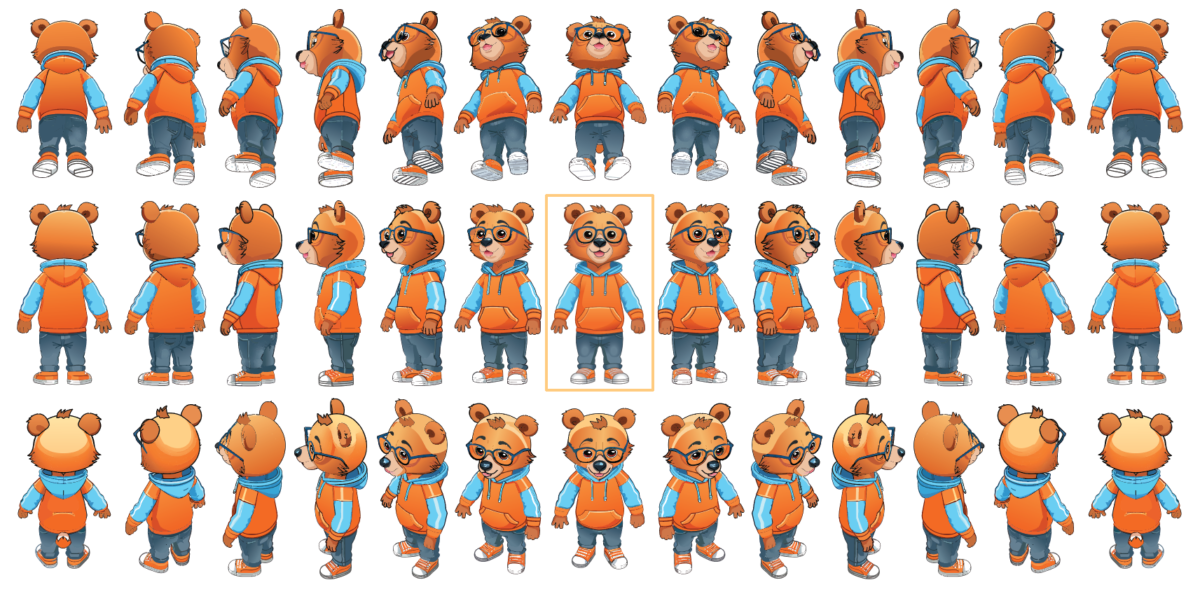
An abbreviated sample of the output Project Turntable generated based on my original front-facing 2D illustration (highlighted at center).
It didn’t surprise me that the results were less than perfect on my first try, but I was still very impressed by what Turntable was able to produce in less than a minute. The output you’re seeing here are from my one and only generation based on this character, and for my needs it’s more than adequate. Because the AI is filling in the blanks as it constructs volume from a single flat image, it inevitably misses out on some of the details, for example in my case:
Front vs. Back: the back of the denim jeans looks identical to the front, pockets and all. Also, the hoodie’s hood shifts color at certain angles, from blue to orange.
Lighting Logic: Some of my hand-drawn highlights in the original front view got “stuck” or smeared across the sides when extrapolated across the rotated images.
Artifacts: some extraneous overlapping shapes surfaced that will require some scrubbing to clean up, including a “tail” that appeared out of nowhere for a few frames.
However, Turntable NAILED one thing that’s harder for humans to fake (at least for me!): maintaining consistent volume of a character design across views. It understood the depth of my character’s physical features, the way the glasses wrap around its head, and the roundness of the hoodie… things that will pay big dividends as I build out the design.
Parting Thoughts: I imagine Turntable will follow a similar trajectory as Illustrator’s Image Trace and evolve over time to offer more granular control, and perhaps (ideally) the ability to interactively refine parameters before commiting to final output. Just as Image Trace grew from a basic utility into a robust, versatile tool, Turntable’s potential is already clear. For now, my workflow is pretty straightforward: keep the Turntable output on a background layer in Illustrator and redraw my vectors on top at the key angles. It’s gotten me over the “blank page” hump of building out character turnarounds, and has motivated me to jump back into this project while catapulting me ahead in the process.